Font reference
Tetra bundles bitmap fonts sized for a 64 × 32 display. Choose a face based on
how much text must fit, whether fixed-width glyphs matter, and which characters
the app needs. render.Text uses tb-8 by default; set its font parameter to
select another face.
Choose a font
This complete app accepts font and sample configuration values, which makes
it useful for checking text before committing to a layout:
load("render.star", "render")

def main(config):
    font = config.str("font", "tb-8")
    sample = config.str("sample", "Aa09 ÑÖ")

    return render.Root(
        child = render.Box(
            width = 64,
            height = 32,
            child = render.Column(
                expanded = True,
                main_align = "center",
                cross_align = "center",
                children = [
                    render.Text(
                        sample,
                        font = font,
                        color = "#ffffff",
                    ),
                ],
            ),
        ),
    )

Use the smallest face that remains legible for the content:
CG-pixel-3x5-monoandCG-pixel-4x5-monomaximize density.tom-thumb,tb-8, and5x8work well for compact labels and values.Dina_r400-6,6x10,6x10-rounded, and6x13improve readability when more vertical space is available.10x20is best for a short value or focal number.
Typography metrics
Bitmap fonts align glyphs around a common baseline. These measurements explain how much space each face needs and where its glyphs sit inside that space.
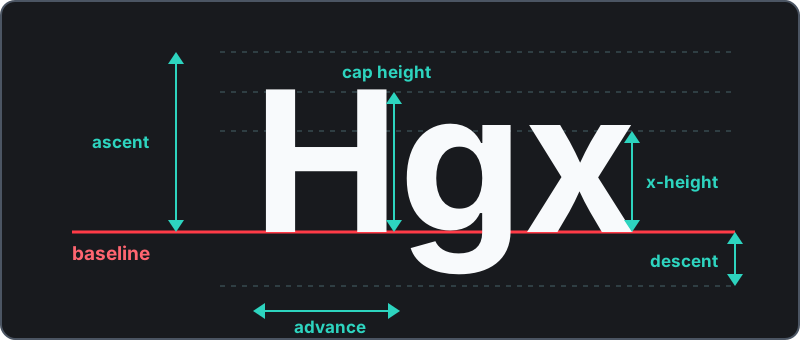
- Baseline
- The line on which most letters sit.
- Ascent
- The distance from the baseline to the font's highest point.
- Cap height
- The distance from the baseline to the top of a capital letter.
- X-height
- The height of a lowercase letter without an ascender.
- Descent
- The distance below the baseline reserved for descending glyphs.
- Advance
- The horizontal distance from one glyph's origin to the next.
render.Text positions a font on its baseline, offset upward by its descent.
A cap height of 6 pixels with a 1-pixel descent is generally enough for
readable upper- and lowercase Latin text. Accented Latin-1 characters such as
Ñ, Ä, and Ö need additional ascent.
Available fonts
Every preview below was rendered by Tetra from the same sample app.
| Preview | Font | Advance | Height | Cap height | Ascent | Descent | Notes |
|---|---|---|---|---|---|---|---|
| tb-8 | 2–6 | 8 | 6 | 7 | 1 | Default, variable-width face derived from 5x8. Digits use a fixed 5-pixel advance. |
 | Dina_r400-6 | 6 | 10 | 6 | 8 | 2 | Jørgen Ibsen. Monospace Basic Latin and Latin-1. |
 | 5x8 | 5 | 8 | 6 | 7 | 1 | Markus Kuhn. Monospace with broad Latin coverage. |
 | 6x13 | 6 | 13 | 9 | 11 | 2 | Markus Kuhn. Taller monospace face with broad Unicode coverage. |
 | 6x10 | 6 | 10 | 7 | 8 | 2 | Olikraus. Medium monospace face for fixed-width layouts. |
 | 6x10-rounded | 6 | 10 | 7 | 8 | 2 | Rounded 6x10 variant by Olikraus, modified by SynthSolar. |
 | 10x20 | 10 | 20 | 13 | 16 | 4 | Markus Kuhn. Large monospace face with broad Unicode coverage. |
 | tom-thumb | 4 | 6 | 4 | 5 | 1 | Robey Pointer. Tiny 4x6 monospace face with 3x5 usable glyph pixels. |
 | CG-pixel-3x5-mono | 4 | 5 | 4 | 5 | 0 | Ilmari Karonen. True 3x5 glyphs for the narrowest layouts. |
 | CG-pixel-4x5-mono | 5 | 5 | 4 | 5 | 0 | Ilmari Karonen. True 4x5 glyphs when one more pixel of width is available. |
Compact numbers with tb-8
All tb-8 digits are 5 × 6 pixels and share the same advance. Set height = 6
and offset = -1 when a numeric row must fit tightly without cropping. The
common +, -, /, *, =, %, and . symbols also fit; a comma extends
into the 1-pixel descent and needs the full height.
load("render.star", "render")

def main(config):
    return render.Root(
        child = render.Box(
            width = 64,
            height = 32,
            child = render.Padding(
                pad = (4, 5, 4, 5),
                child = render.Column(
                    children = [
                        render.Text(
                            "COMPACT",
                            font = "CG-pixel-3x5-mono",
                            color = "#94a3b8",
                        ),
                        render.Box(width = 1, height = 4),
                        render.Text(
                            "123.45%",
                            font = "tb-8",
                            height = 6,
                            offset = -1,
                            color = "#22d3ee",
                        ),
                    ],
                ),
            ),
        ),
    )

Character coverage
Basic Latin covers ASCII letters, digits, punctuation, and common symbols.
Latin-1 Supplement adds characters used by many Western European languages.
Use a face with known Latin-1 support for names and locations, and preview the
actual text when an app may receive characters beyond those ranges. Unsupported
glyphs cannot be recovered by changing height or offset; select a font with
the required coverage instead.